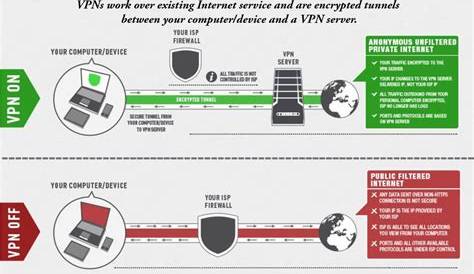
As a remote worker concerned about online security, practicing safe browsing is essential for protecting your personal information. Safe browsing means actively minimizing risks while navigating the internet to ensure your data remains secure from threats. By understanding the available tools, recognizing online dangers, and adopting best practices, you can significantly enhance your online safety.
What does safe browsing really mean?
Safe browsing refers to the behaviors and practices that help you protect your personal data while using the internet. It involves being aware of potential risks, such as identity theft, phishing attacks, and malware, and taking proactive measures to safeguard your information. Practicing safe browsing reduces the chances of falling victim to these threats, ensuring that your online experiences are secure and private.
What tools and settings can enhance my browsing safety?
To improve your browsing safety, consider the following tools and settings:
- VPN (Virtual Private Network): A VPN encrypts your internet connection, making it harder for hackers to intercept your data. It also masks your IP address, providing an additional layer of anonymity.
- Ad Blockers: These tools prevent intrusive ads and pop-ups, which can often lead to malicious sites. By blocking these ads, you reduce the risk of clicking on harmful links.
- Browser Security Settings: Most modern browsers have built-in security features. Ensure that you enable settings such as blocking third-party cookies, enabling phishing and malware protection, and using HTTPS whenever possible.
- Antivirus Software: Keeping your antivirus software up to date can protect you from malware and other online threats.
What are the most common online threats to watch out for?
Several online threats can compromise your security:
- Phishing Scams: These are fraudulent attempts to obtain sensitive information by masquerading as trustworthy sources. For example, you may receive an email that appears to be from your bank, asking you to verify your account information.
- Malware: Malicious software that can infect your device, steal information, or cause damage. This can happen through downloads or visiting compromised websites.
- Identity Theft: This occurs when someone steals your personal information to impersonate you, often for financial gain. Always be cautious about sharing personal information online.
How can I manage my passwords and personal data securely?
To securely manage your passwords and personal data, consider these best practices:
- Create Strong Passwords: Use a mix of uppercase and lowercase letters, numbers, and symbols to create complex passwords. Avoid common words or easily guessable information.
- Use a Password Manager: These tools help you generate and store strong passwords securely, so you don’t have to remember them all.
- Enable Two-Factor Authentication (2FA): This adds an additional layer of security by requiring a second form of verification, such as a code sent to your phone, when logging in to accounts.
- Be Cautious When Sharing Information: Only provide personal data to trusted sites and avoid sharing sensitive information over unsecured channels.
How can I spot suspicious websites and links?
Recognizing red flags can help you avoid scams:
- Check the URL: Look for HTTPS in the web address; the 'S' indicates a secure connection. Be wary of URLs with unusual spellings or extra characters.
- Examine Website Design: Often, fraudulent websites may look unprofessional or poorly designed. Trustworthy sites typically have a polished appearance.
- Be Skeptical of Unsolicited Communications: If you receive an unexpected email or message with links, verify the sender before clicking anything. Phishing attempts often disguise themselves as legitimate communications.
Conclusion
To enhance your online safety, start by implementing the tools and practices discussed. Regularly review your security settings, stay informed about potential threats, and maintain good password hygiene. By taking these steps, you can effectively protect your privacy while browsing the internet.
Frequently Asked Questions
What should I do if I think I've been a victim of phishing?
If you suspect you've been a victim of phishing, change your passwords immediately, enable two-factor authentication, and monitor your accounts for any unauthorized transactions.
Are free VPNs safe to use?
While some free VPNs can be safe, many may log your data or show ads. It's often safer to invest in a reputable paid VPN service.
How often should I change my passwords?
It's a good practice to change your passwords every 3 to 6 months, or sooner if you suspect a breach.
What is the best way to secure my personal data online?
Using strong passwords, enabling two-factor authentication, and being cautious about sharing information can greatly secure your personal data online.