As a small business owner, securing your company's data is essential. Setting up a firewall and antivirus protection is a vital step in safeguarding your business from cyber threats. This guide will help you configure these tools effectively, even without a technical background.
Why You Need a Firewall and Antivirus
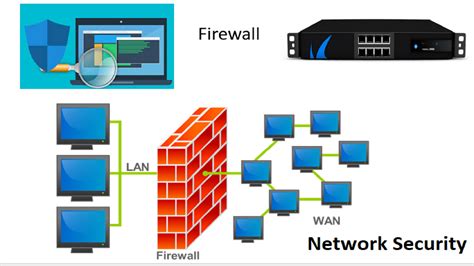
Firewalls and antivirus software are your first line of defense against cyber attacks. A firewall acts as a barrier between your internal network and external threats, controlling incoming and outgoing traffic based on predetermined security rules. This helps prevent unauthorized access to your systems. Antivirus software scans for and removes malicious software, or malware, that can infect your devices and steal sensitive information. Together, they provide comprehensive protection against a range of threats, from hackers to viruses. For a small business, neglecting these protections can lead to significant financial and reputational damage.
Choosing the Right Firewall for Your Needs
There are several types of firewalls to choose from, each with its own advantages.
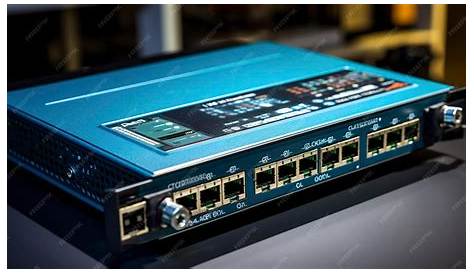
- Hardware Firewalls: These are physical devices installed between your network and the internet. They provide robust protection and are suitable for businesses with multiple devices.
- Software Firewalls: Installed on individual computers, these are easier to manage for small setups but might not offer the same level of protection as hardware firewalls.
- Cloud-Based Firewalls: These are hosted in the cloud and can be an excellent option for businesses looking for scalable solutions.
When selecting a firewall, consider the size of your business, the number of devices, and your budget. Look for features like user access controls, logging capabilities, and ease of updates. Ensure that the firewall you choose is compatible with your existing network and meets your specific security needs.
Steps to Configure Your Firewall
Prerequisites
- A firewall device or software.
- Access to your modem and router.
- Basic knowledge of your network setup.
- Choose the type of firewall you need based on your business size and requirements.
- Install the hardware firewall between your modem and router, or download the software firewall to your computer.
- Access the firewall settings through your web browser or application interface. This usually involves entering an IP address like
192.168.1.1or192.168.0.1. - Log in using the default credentials, which you can typically find in the user manual or on the manufacturer’s website.
- Update the firewall’s firmware to the latest version to ensure you have the latest security patches.
- Configure the firewall rules according to your business needs. Set rules to block unwanted traffic and allow necessary services. For example, allow HTTP and HTTPS traffic for web browsing.
- Save your settings and restart the firewall if necessary to apply changes.
- Regularly check the logs to monitor for any suspicious activities.
Incorrectly configuring your firewall can lead to network vulnerabilities.
Installing and Configuring Antivirus Software
Prerequisites
- A compatible antivirus software package.
- Administrative privileges on your computer.
- Internet connection for downloading updates.
- Research and choose an antivirus software that fits your needs. Look for features like real-time scanning, automatic updates, and multi-device support.
- Purchase and download the antivirus software from the official website or a trusted source.
- Double-click the downloaded file to start the installation process. Follow the on-screen prompts to proceed.
- Agree to the terms and conditions and select the installation type (typical or custom). Custom installations allow you to choose specific features.
- Once installed, run the initial scan to check for existing threats on your system. This may take some time depending on the number of files you have.
- Configure the settings to enable real-time protection, scheduled scans, and automatic updates to keep your software current.
- Regularly check for updates to the antivirus software to ensure it can protect against new threats.
Running an initial scan can take a long time and may slow down your system temporarily.
Testing Your Setup for Security Effectiveness
- After configuring your firewall and antivirus, perform a test to confirm they are functioning correctly.
- Use online tools that check your firewall's responsiveness. For example, you can visit websites that offer firewall testing services. They will attempt to ping your firewall and report back on its security level.
- Conduct a manual check of your antivirus by attempting to download a test virus from a reputable testing site, which simulates malware without harming your system. Confirm that your antivirus detects and quarantines the file.
- Review the firewall and antivirus logs for any alerts or notifications that indicate potential threats or unauthorized access attempts.
Conclusion
Now that you know how to set up a firewall and antivirus, make it a habit to regularly check your security settings and stay updated on the latest threats. This proactive approach will help keep your business data secure. If you feel overwhelmed at any point, consider reaching out to an IT professional for assistance.
Frequently Asked Questions
How often should I update my antivirus software?
You should ensure your antivirus software updates automatically or check for updates at least once a week.
Can I use free antivirus software for my business?
While free antivirus software can provide basic protection, it's often limited in features. For a business, investing in a paid solution is usually recommended for better security.
What should I do if my firewall blocks legitimate traffic?
You can adjust the firewall settings to create exceptions for trusted applications or services that are being blocked.
How do I know if my firewall is working correctly?
You can test your firewall using online tools that assess its responsiveness and check for vulnerabilities.