If you're building a new computer and considering Windows 11, you need to decide between a retail or an OEM license. A retail license offers more flexibility and support, while an OEM version is typically cheaper but has certain restrictions. Understanding the differences between these two options will help you make the right choice for your needs.
What are the main differences between retail and OEM licenses?
The primary differences between retail and OEM licenses for Windows 11 relate to ownership, support, and transferability.
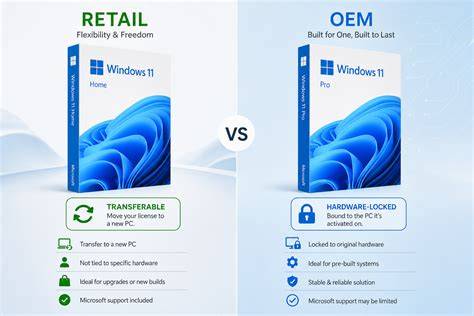
- Ownership: A retail license is tied to your Microsoft account and can be transferred to a new PC if you upgrade. An OEM license is tied to the hardware it was originally installed on and cannot be transferred.
- Support: Retail licenses come with full Microsoft support, while OEM licenses typically have limited support, which is managed by the hardware manufacturer. This can impact the assistance you receive if issues arise.
- Cost: Retail licenses tend to be more expensive than OEM versions, which are often cheaper because they are sold through hardware manufacturers.
These distinctions can significantly affect your experience based on your specific needs.
How does customer support differ for retail and OEM versions?
Customer support is a major differentiator between retail and OEM licenses.
Retail versions of Windows 11 provide direct access to Microsoft’s customer support for installation issues, troubleshooting, and general inquiries. This can be particularly valuable if you encounter problems during installation or need help with advanced features.
In contrast, OEM versions are supported by the hardware manufacturer. If you encounter issues, you'll need to rely on the manufacturer's support services, which may not always be as comprehensive or responsive as Microsoft's. Warranty periods may also differ, with OEM versions often having limited warranty options.
What happens if I want to upgrade or transfer my Windows 11 license?
Upgrading or transferring your Windows 11 license involves different rules for retail and OEM.
- Retail licenses can be easily transferred to a new computer. If you upgrade your hardware or build a new machine, you can deactivate the license on your old machine and activate it on the new one by logging into your Microsoft account.
- OEM licenses cannot be transferred. They are tied to the original hardware they were installed on. If your computer fails and you replace the motherboard or other critical components, you may lose your license unless you can prove it’s the same machine.
If you plan to upgrade or change components in the future, a retail license is the better option.
Are there any common misconceptions about retail versus OEM?
Several misconceptions about retail and OEM licenses can lead to confusion.
- Reliability: Some believe that OEM versions are less reliable than retail versions. However, both versions of Windows 11 offer the same core functionality and system performance. The main differences lie in support and transferability.
- Usability: Another misconception is that OEM versions are intended only for system builders or professionals. While they are often sold to manufacturers and builders, they can be purchased by anyone. This makes them a viable option for individuals seeking a lower-cost solution.
- Activation Issues: Some users worry that OEM licenses will face more activation problems. Activation policies are consistent across both versions, so if you encounter issues, they usually stem from other factors rather than the type of license.
Comparison of Windows 11 Retail vs. OEM
| Criteria | Retail License | OEM License |
|---|---|---|
| Ownership | Tied to Microsoft account; transferable | Tied to original hardware; non-transferable |
| Support | Direct support from Microsoft | Limited support from hardware manufacturer |
| Cost | Generally more expensive | Generally cheaper |
The differences highlighted in the table above show that retail licenses offer greater flexibility and support, while OEM licenses provide a cost-effective option that may suit users with stable hardware needs.
Trade-offs between retail and OEM licenses
Choosing between retail and OEM licenses involves weighing certain trade-offs.
- A retail license allows for flexibility in hardware upgrades and provides full support from Microsoft, making it ideal for users who may frequently change their setup or require assistance.
- An OEM license is more budget-friendly, but it lacks transferability and comprehensive support, which can be limiting if you plan on upgrading your hardware in the future.
Who should choose retail or OEM?
Deciding between a retail or OEM version of Windows 11 depends on your specific needs.
- If you anticipate upgrading your hardware or need reliable support, investing in a retail license is the better choice.
- If you're looking for a cost-effective option and are certain your current setup will remain unchanged, an OEM version could be a suitable choice.
Conclusion
Choosing between a retail or OEM version of Windows 11 hinges on your priorities for flexibility and support. A retail license is a wise investment if you foresee hardware upgrades or require dependable support. Conversely, if cost is your primary concern and you don't plan to change your setup, an OEM version may serve you well.
Frequently Asked Questions
Can I install Windows 11 OEM on a different computer?
No, OEM licenses are tied to the original hardware and cannot be transferred to another computer.
What happens if I build a new PC and have an OEM license?
You will not be able to transfer the OEM license to your new PC. You will need to purchase a new license.
Is it possible to upgrade from OEM to retail?
You cannot upgrade an OEM license to a retail license; you would need to purchase a retail license separately.