
If you're considering upgrading from Windows 10 to Windows 11, it's worth examining whether the new features justify the change. Windows 11 offers a variety of enhancements, including a more modern interface, improved performance, and new security features. In this article, we'll explore these differences to help you decide if upgrading makes sense for you.
What are the standout features of Windows 11?
Windows 11 introduces several notable features that enhance productivity and user experience. The redesigned taskbar is centered on the screen, providing a fresh look and easier access to pinned applications. Snap Layouts improve window management, enabling you to arrange multiple open windows in a grid format effortlessly. Widgets offer personalized news and updates directly on your desktop, while the virtual desktops feature lets you create separate environments for different tasks, such as work and gaming. Additionally, Windows 11 optimizes touch controls for tablets, allowing for smoother interaction with touchscreen devices. The new Microsoft Store also provides a wider selection of apps and improved performance.
How does Windows 11's interface differ from Windows 10?
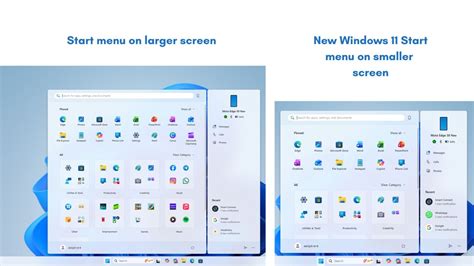
The interface in Windows 11 significantly departs from Windows 10, focusing on a more streamlined and modern look. The Start menu is now simplified, dropping the Live Tiles in favor of a grid of pinned apps and a search bar at the top. The taskbar icons are centered, which can feel more intuitive but may take some getting used to if you're accustomed to the left-aligned layout in Windows 10. The overall design incorporates softer corners and a minimalistic aesthetic, creating a more cohesive and visually appealing workspace. Enhanced transparency and animations contribute to a more contemporary user experience.
What are the performance enhancements in Windows 11?
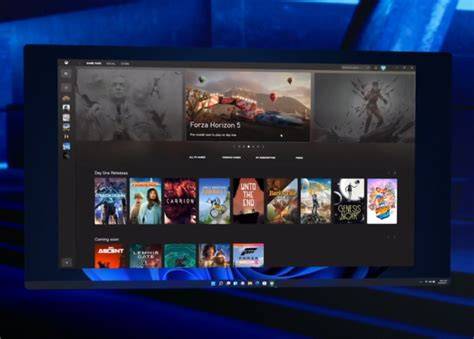
Windows 11 is optimized for better performance, particularly in gaming and multitasking. The new DirectStorage feature allows games to load faster by utilizing the speed of NVMe SSDs, leading to significantly reduced load times in supported games. Windows 11 also improves memory management, helping applications run more efficiently and enhancing multitasking capabilities. Users may notice smoother transitions and improved responsiveness when switching between applications compared to Windows 10. Additionally, Windows 11 supports Auto HDR, enhancing the visual quality of games.
Will my current hardware run Windows 11?
Upgrading to Windows 11 requires specific hardware that is more stringent than for Windows 10. You'll need a compatible 64-bit processor, at least 4 GB of RAM, and 64 GB of storage. A TPM 2.0 chip is also necessary for enhanced security features. To check if your hardware is compatible, run the PC Health Check tool provided by Microsoft. If your device doesn't meet these requirements, you may need to consider hardware upgrades or continue using Windows 10 for now.
Comparison of Windows 10 and Windows 11 features
Criteria Used
- User Interface
- Performance
- Gaming Capabilities
- Security Features
- Compatibility
Differences
| Feature | Windows 10 | Windows 11 |
|---|---|---|
| User Interface | Traditional layout with Live Tiles | Centered taskbar, simplified Start menu |
| Performance | Standard optimizations | Enhanced memory management, DirectStorage for faster game loading |
| Gaming Capabilities | Basic support for gaming | DirectStorage, Auto HDR for improved visuals |
| Security Features | Standard security features | Enhanced security with TPM 2.0 requirement |
| Compatibility | Broad compatibility | Stricter hardware requirements |
Trade-offs
Upgrading to Windows 11 offers a modern interface and improved performance, particularly for gaming. However, users may need to upgrade their hardware if it doesn't meet the new requirements. Those who are comfortable with Windows 10 and its features may find it unnecessary to upgrade right away.
Is it worth upgrading to Windows 11?
Deciding whether to upgrade to Windows 11 depends on your specific needs and how you use your computer. If you value a refreshed interface, enhanced gaming performance, and new productivity features, making the switch could be beneficial. However, if your hardware doesn't meet the requirements or you're satisfied with Windows 10's functionality, you might choose to stay put for now. Windows 10 will continue to receive support until October 2025, giving you ample time to evaluate the new operating system.
Conclusion
If the new features and performance enhancements of Windows 11 appeal to you and your hardware is compatible, upgrading could be worthwhile. Otherwise, you can continue using Windows 10 without issue. Assess your usage patterns and hardware capabilities to make the best choice for your situation.
Frequently Asked Questions
What are the system requirements for Windows 11?
Windows 11 requires a compatible 64-bit processor, 4 GB of RAM, 64 GB of storage, and a TPM 2.0 chip.
Can I upgrade from Windows 10 to Windows 11 for free?
Yes, if your device meets the system requirements, you can upgrade from Windows 10 to Windows 11 at no additional cost.
What is DirectStorage in Windows 11?
DirectStorage is a feature that allows games to load faster by leveraging the speed of NVMe SSDs.
Will my applications still work on Windows 11?
Most applications that run on Windows 10 should work on Windows 11, but it's advisable to check for specific compatibility.