The Windows 11 25H2 update is a major upgrade that introduces new features and improvements to enhance your overall experience. This update focuses on performance optimizations and usability enhancements, making it beneficial for users looking for better functionality and efficiency.
What is the Windows 11 25H2 update?
The Windows 11 25H2 update is the second major update for Windows 11 in 2023. It aims to enhance system performance, security, and user experience by introducing new features and addressing bugs and performance issues from previous versions.
New features and enhancements
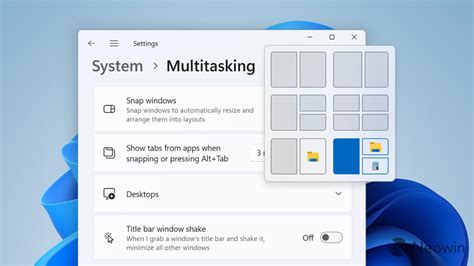
The 25H2 update includes several key features that enhance your experience with Windows 11. For example, the update improves Snap layouts, allowing for more flexible window management and better multitasking. You can easily organize your workspace by snapping multiple applications in a customizable way.
Another significant addition is the updated Widgets panel, which offers more personalization options, letting you tailor the information displayed to your preferences. Additionally, the update introduces new accessibility features, such as improved voice typing capabilities and enhanced screen reader support, making Windows more inclusive.
Compatibility and performance implications
The 25H2 update is designed to work with most existing Windows 11 hardware, but it may not support older devices that do not meet the minimum system requirements. Check your system specifications to ensure compatibility before proceeding with the update.
Many users report smoother operation and faster boot times after applying the update. However, users with less powerful hardware might experience slower performance if their systems are strained by new features. It's essential to monitor your system's performance post-update and adjust settings as needed.
Preparing your PC for the update
To prepare your PC for the Windows 11 25H2 update, follow these steps:
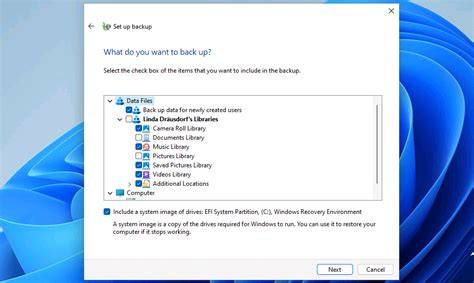
- Back up your important files to prevent data loss during the update.
- Check for any pending updates in Settings to ensure your system is fully up to date before initiating the 25H2 update.
- Run the Windows Compatibility Checker to verify your system meets the requirements for the 25H2 update.
- Ensure you have enough disk space available; typically, you’ll need at least 20 GB of free space.
- Disable any third-party antivirus software temporarily to avoid conflicts during installation.
Common concerns and misconceptions
Many users have questions or misconceptions about the Windows 11 25H2 update. A common concern is data loss; however, if you back up your files as recommended, you should not lose any data during the update process.
Another misconception is that older hardware will be completely unsupported. While some features may not work as intended on outdated systems, many older devices will still be able to run the update. Lastly, some users worry that updates will slow down their devices permanently. In many cases, performance improves after updates, provided the hardware can handle the new features.
Conclusion
Understanding the 25H2 update is crucial for a smooth transition. By backing up your data and checking compatibility, you can ensure a seamless experience with the new features and enhancements this update offers.