Windows 11 is Microsoft's latest operating system, officially released on October 5, 2021. It features numerous updates aimed at enhancing both user experience and system performance.
What is the release date of Windows 11?
Windows 11 became available to the general public on October 5, 2021. Microsoft announced this date during their Summer 2021 event, where they highlighted the new features and improvements that accompanied the operating system. The rollout began with eligible Windows 10 devices receiving the upgrade first, and it was expected to continue into 2022, ensuring that users could transition smoothly.
What new features does Windows 11 bring?
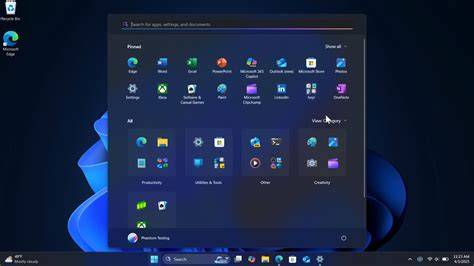
Windows 11 offers several notable features that enhance both aesthetics and functionality. One of the most visible changes is the redesigned Start Menu, which is now centered on the taskbar instead of being aligned to the left. This new layout aims to declutter the user experience.
Another significant improvement is the introduction of Snap Layouts, which allows you to organize open windows more efficiently by providing pre-defined layouts that you can easily snap your applications into. For example, say you often work with a document and a web browser side by side; Snap Layouts can help you set this up quickly.
Furthermore, Windows 11 includes enhanced gaming features like DirectStorage and Auto HDR, which improve load times and visuals for compatible games. Overall performance is also enhanced, with optimizations for speed and battery life, catering to both gamers and everyday users.
What are the system requirements for Windows 11?
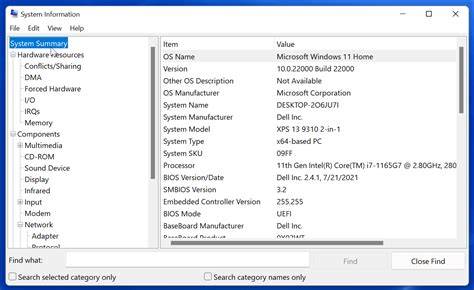
To run Windows 11, your device must meet certain minimum and recommended system requirements. Here are the key specifications:
- Processor: 1 GHz or faster with at least 2 cores on a compatible 64-bit processor.
- RAM: 4 GB or more.
- Storage: 64 GB or larger storage device.
- System firmware: UEFI, Secure Boot capable.
- TPM: Trusted Platform Module (TPM) version 2.0.
- Graphics card: DirectX 12 compatible graphics / WDDM 2.x.
- Display: >9” with HD Resolution (720p).
These requirements ensure that Windows 11 runs smoothly and securely, taking full advantage of the new features.
How does Windows 11 compare to Windows 10?
There are several key differences between Windows 11 and Windows 10 that may influence your decision to upgrade.
| Feature | Windows 10 | Windows 11 |
|---|---|---|
| Start Menu | Left-aligned | Centered |
| Snap Features | Basic | Snap Layouts |
| Widgets | Limited | Enhanced, customizable |
| Gaming Features | Standard | DirectStorage, Auto HDR |
| Virtual Desktops | Basic functionality | Improved organization |
Windows 11 focuses on a more modern interface with a cleaner look and feel. The enhanced Snap features allow for better multitasking, while the gaming improvements cater specifically to the gaming community.
What should I consider before upgrading?
Before upgrading to Windows 11, there are several factors to evaluate:
- Compatibility: Check if your current hardware meets the system requirements for Windows 11. You can use the PC Health Check tool from Microsoft to verify compatibility.
- Software Compatibility: Ensure that the programs and applications you rely on are compatible with Windows 11. Some legacy applications may not work on the new OS.
- User Experience: Familiarize yourself with the new interface and features. You might find that changes like the centered taskbar and Snap Layouts require some adjustment.
- Backup Your Data: Before upgrading, back up important files to avoid any data loss during the installation process.
By weighing these considerations, you can make a more informed decision about whether to upgrade.
Conclusion
If you're excited about the new features and improved performance of Windows 11, check your device's compatibility and prepare for the upgrade. Staying informed will help you transition smoothly to this new operating system.
Frequently Asked Questions
Will Windows 10 users be able to upgrade to Windows 11 for free?
Yes, eligible Windows 10 users can upgrade to Windows 11 for free, provided their devices meet the necessary system requirements.
What is the difference in gaming features between Windows 10 and Windows 11?
Windows 11 introduces features like DirectStorage and Auto HDR, which enhance gaming performance and visuals compared to Windows 10.
Can I install Windows 11 on older hardware?
Windows 11 has specific system requirements, including TPM 2.0 and UEFI support, which may prevent installation on older hardware.
What should I do if my device is not compatible with Windows 11?
If your device is not compatible, you may need to consider upgrading your hardware or continuing to use Windows 10, which will receive support until October 14, 2025.