Windows 11 is built with a range of security features designed to protect your personal information and keep your device secure. Understanding how to enable and configure tools like Windows Hello, BitLocker, and Windows Defender can help ensure your computer remains safe from threats.
What are the core security features in Windows 11?
Windows 11 includes several core security features that enhance your device's protection. Windows Hello allows you to log in using facial recognition or a fingerprint, making it difficult for unauthorized users to access your system. BitLocker is a built-in encryption tool that protects your files by encrypting your entire drive, ensuring that data remains safe even if your device is lost or stolen. Another significant feature is Windows Defender, which provides real-time protection against malware and other security threats.
In addition to these, Windows 11 employs a security architecture that integrates hardware and software protections to safeguard your data. This architecture is essential as it helps to prevent unauthorized access and protects against malicious software.
How does Windows 11 improve upon previous versions?
Windows 11 significantly enhances security compared to Windows 10. One major improvement is Device Encryption, which automatically encrypts your device if you have a compatible setup. Additionally, Windows 11 requires TPM 2.0 (Trusted Platform Module) for installation, offering hardware-based security features that were not mandatory in Windows 10. This integration results in a higher level of protection against firmware attacks and unauthorized access.
What should I do to ensure these features are activated?
To ensure the security features in Windows 11 are activated, follow these steps:
- Open Settings by pressing
Windows + I. - Select Accounts.
- Click on Sign-in options and check the settings for Windows Hello.
- To enable BitLocker, go to System > Storage > Advanced storage settings > Disks & volumes. Select the drive you want to encrypt and click on BitLocker.
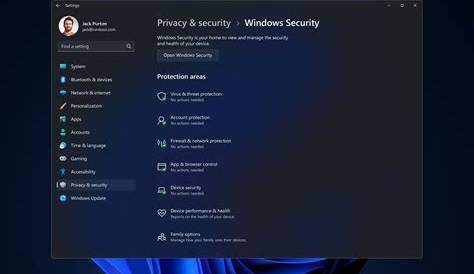
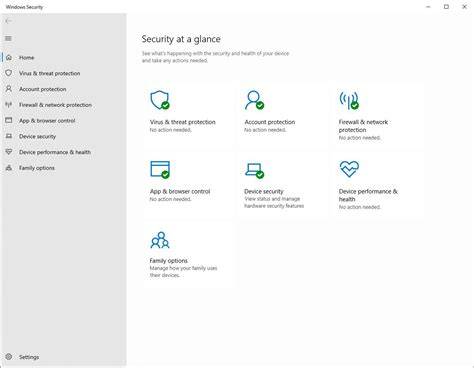
- For Windows Defender, go to Privacy & security > Windows Security > Virus & threat protection and ensure it is turned on.
Are there any common misconceptions about Windows 11 security?
Many users have misconceptions about Windows 11 security features. One common myth is that Windows Defender is inadequate for protection. In reality, Windows Defender has improved significantly and offers comprehensive protection against most threats. Another misconception is that you don't need to worry about security if you have a third-party antivirus program. While these programs can enhance security, Windows 11's built-in features provide a strong foundation that should not be overlooked.
Where can I find more resources for Windows 11 security?
To learn more about securing your Windows 11 device, visit the official Microsoft support site for detailed guides and troubleshooting. Community forums, such as Microsoft Community or Reddit, can be helpful for user experiences and tips. Additionally, Microsoft Learn offers free resources and training on Windows security features.
Conclusion
Start by exploring and enabling the security features mentioned to ensure your device is well-protected. Familiarize yourself with each tool, and don't hesitate to seek out additional resources if you have questions. Keeping your system updated and regularly checking your security settings will help maintain a secure environment.
Frequently Asked Questions
What is Windows Hello?
Windows Hello is a feature that allows you to log in to your device using facial recognition or fingerprint scanning, providing a secure and convenient way to access your system.
How does BitLocker work?
BitLocker encrypts your entire drive, making your files inaccessible without the proper authentication. This protects your data even if your device is lost or stolen.
Is Windows Defender enough for security?
Yes, Windows Defender offers robust protection against malware and various threats, especially when combined with Windows 11's other security features.
Do I need a third-party antivirus with Windows 11?
While Windows Defender is quite effective, some users prefer additional layers of protection through third-party antivirus programs. However, it's not strictly necessary.